

Free US shipping on orders over $25 — worldwide distribution available

Engineering Music Enjoyment for Everyone since 2005

Volume orders for schools, clinics, airlines & resellers

Talk to our team
0%

A bluetooth audio transmitter and receiver 2-in-1 can make older audio equipment more flexible without replacing it. In transmitter mode, it sends sound from a wired source, such as a television’s headphone jack, to compatible Bluetooth headphones. In receiver mode, it accepts audio from a phone and passes it to a wired speaker or stereo. One compact device can serve both purposes. Useful, but not magic.

That flexibility matters in ordinary settings. You might watch a late-night show through wireless headphones, then connect the same adapter to a car’s auxiliary input for music from your phone. A small status light and clear mode switch can make setup easier, especially when the device sits behind a television. Check the ports before buying: some models use 3.5 mm connections, while others offer different options. Compatibility depends on the source, headphones, and supported Bluetooth profiles.

There are trade-offs worth considering. Sound delay can distract during video, and codec support varies between devices. Battery life, range, and the number of simultaneous connections also differ by model. Read the specifications, not just the product headline. A 2-in-1 adapter may reduce clutter, though it adds one more device to charge and pair. That is a small inconvenience. Still, for people keeping a wired stereo or sharing audio without disturbing others, this simple bridge can be practical—provided its connections and performance match the way they actually listen.
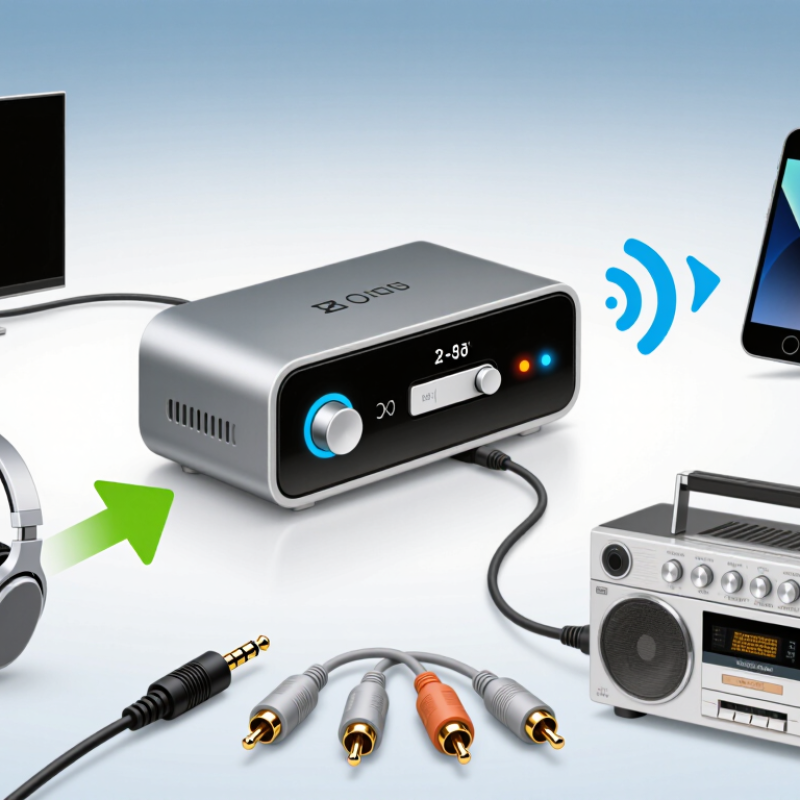
Why Use a Bluetooth Audio Transmitter and Receiver 2 in 1?

What a 2-in-1 Bluetooth Audio Transmitter and Receiver Is

A 2-in-1 Bluetooth audio transmitter and receiver combines two functions in one small device. In transmitter mode, it sends sound from a source, such as a television or airplane entertainment screen, to compatible Bluetooth headphones. A short cable connects the device to the audio output. The transmitter converts that signal into a wireless one, so you can listen without sitting close to the screen.

In receiver mode, the device works in the opposite direction. Pair it with a phone or tablet, then connect its audio output to wired speakers, a stereo system, or a car’s auxiliary input. Music from your phone can play through those speakers. The exact connections vary, so check the ports and included cables before buying. Small details matter.

Mode selection is usually handled by a switch or button, though the controls differ between models. Some units support two headphones at once; others do not. Pairing can also take a few tries, especially when several devices are nearby. That’s normal, but still a little annoying. Sound delay may occur while watching video, and battery life depends on use. A 2-in-1 device saves space, but it is not automatically the best choice for every setup. Check compatibility with your source and headphones first.

How Transmitter and Receiver Modes Work

Why Use a Bluetooth Audio Transmitter and Receiver 2 in 1?

In transmitter mode, the unit sends sound from a wired source to Bluetooth headphones or a speaker. Connect its audio input to a television’s headphone jack or another compatible output, then pair it with your listening device. The TV keeps playing as usual, but sound travels wirelessly to your headphones. Check the manual for the correct mode and pairing steps; controls differ between devices. Small details matter.

In receiver mode, the direction changes. A phone sends audio over Bluetooth to the unit, which passes it through a cable to wired speakers, a car stereo, or a home amplifier. Connect the receiver’s output to the sound system’s input, select receiver mode, and pair your phone. You can then play music without replacing equipment that still works well.

One device can cover both jobs, which is useful when moving between a television and an older stereo. Still, setup can be fiddly. A wrong mode or cable connection may leave you with silence. Bluetooth range, battery life, and audio delay also vary by model and surroundings. For video, test lip synchronization before settling in; even a slight delay can be distracting. The two modes are flexible, but they do not make every connection automatic.

Which Devices and Audio Connections It Supports

A Bluetooth audio transmitter and receiver can connect devices that do not share the same wireless features. In transmitter mode, it sends sound from a TV, computer, or portable music player to Bluetooth headphones or a speaker. In receiver mode, it takes audio from a phone or tablet and passes it to a wired speaker, car stereo, or older home audio system. The exact setup depends on the unit’s ports and supported Bluetooth profiles.

Check the audio connection before buying. Many units use a 3.5 mm AUX socket; some also accept optical or RCA connections, often with an included or separate cable. A USB port may provide power only, not audio. Not every socket carries sound. For example, a TV’s optical output may need a setting change before audio comes through. Look for clear mode labels, and confirm whether the device supports the headphones or speaker you plan to use. Bluetooth range and lip-sync performance can vary, too. Test it in the room where you will listen; walls and distance matter. A little setup can be fiddly. That detail is easy to overlook.

Why Use a Bluetooth Audio Transmitter and Receiver 2 in 1?

A transmitter sends audio from a wired source to Bluetooth headphones or speakers. A receiver takes audio from a Bluetooth source and sends it to wired speakers or an audio system. The chart shows common connection roles when an interface is present; supported connectors vary by device.

Benefits for Home, Travel, and Everyday Listening

A Bluetooth audio transmitter and receiver combines two useful roles in one compact adapter. At home, transmitter mode can send sound from a television or older stereo to wireless headphones. That helps when someone else is sleeping or when dialogue is difficult to hear at normal volume. Receiver mode works in reverse, sending audio from a phone to speakers with a compatible audio input. Connection quality depends on distance, walls, and supported audio formats. Convenient, not magic.

Tips: Check which mode you need and whether your device has a 3.5 mm or optical connection. Keep the adapter close to the audio source; a thick wall can cause dropouts. For travel, pack its charging cable and test pairing at home. One small annoyance: some adapters need pairing again after a power cycle.

In a hotel room, a transmitter can connect a television’s headphone output to personal Bluetooth headphones, if the television supports external audio. At a desk, receiver mode can feed a small speaker from a phone without replacing existing equipment. This can reduce clutter, though it adds one more battery to remember. Some older devices use unusual ports, and an adapter will not solve every compatibility issue. A quick port check can save frustration.

What to Check Before Choosing a 2-in-1 Adapter

Before choosing a 2-in-1 Bluetooth adapter, check which job you need it to do. Transmit mode sends audio from a television or laptop to wireless headphones. Receive mode sends phone audio to wired speakers or a car stereo. Check the actual ports, too. A television may use optical audio, while older speakers may need a 3.5 mm or RCA connection. The right cable matters.

Check Bluetooth codec support on both the adapter and your headphones. Matching codecs can help reduce delay, but they cannot guarantee perfectly synchronized video and sound. Look for a low-latency option if dialogue timing matters. Check whether the unit can pair with two headphones at once, and whether that feature works in transmit mode. Small details matter. A spec sheet can look complete, yet omit which mode supports a feature. I would verify that before buying.

Consider battery life, charging options, and the distance between the adapter and your listening spot. A wall or cabinet can weaken the signal, so advertised range may not match a real room. If you plan to use it with a television for hours, check whether it can operate while charging. Also confirm which cables come in the box; replacing one later is a small hassle, but an avoidable one.

FAQS

What does transmitter mode do?

It sends audio from a wired source, such as a television, to Bluetooth headphones or a speaker. Connect the audio output, select transmit mode, and pair your device.

How does receiver mode work?

Your phone sends audio to the adapter over Bluetooth. The adapter then passes it through a cable to wired speakers, a car stereo, or an amplifier.

Can one adapter connect a television and older speakers?

Yes, its two modes can serve both setups. Check the ports first; a television may use optical audio, while speakers may need a 3.5 mm or RCA cable.

Will it work with any television or sound system?

Not always. The device needs a compatible audio output or input, and some older equipment has unusual ports. A quick port check can prevent a silent setup.

Can I watch video without audio delay?

Delay varies with the adapter, headphones, and surroundings. A low-latency option may help, but test dialogue synchronization before settling in.

Can two headphones connect at once?

Some adapters support two headphones, but the feature may work only in transmit mode. Check the instructions carefully; product details can be vague.

What can interrupt the Bluetooth connection?

Distance, walls, and cabinets can weaken the signal. Keep the adapter near the audio source, especially if a thick wall sits between devices.

What should I prepare before using it while traveling?

Pack its charging cable and test pairing at home. Some adapters need pairing again after a power cycle. A small annoyance, but worth remembering.

Conclusion

A bluetooth audio transmitter and receiver 2-in-1 is a compact adapter that can send audio from a wired source to Bluetooth headphones or speakers, and receive audio from a phone or tablet for playback through a wired speaker or stereo system. Transmitter mode is useful when a device has an audio output but no Bluetooth connection, while receiver mode adds wireless audio streaming to equipment with an auxiliary or other compatible input. Depending on the model, connections may include a 3.5 mm audio jack, optical audio, or USB, so it is important to check which ports your devices support.

This type of adapter can make home listening more flexible, help connect entertainment devices to wireless headphones while traveling, and reduce the need for separate transmitters and receivers in everyday use. Before choosing one, consider supported connections, Bluetooth range, battery life, audio delay, pairing options, and whether it can connect to multiple devices at once. The right choice depends on your equipment and how you plan to listen.

Amelia

Amelia

Amelia is a dedicated marketing professional with a strong understanding of product strategy, customer needs, and the evolving dynamics of modern business. As a key contributor to the company’s content and communications efforts, she regularly publishes insightful, practical articles on the company......