

Free US shipping on orders over $25 — worldwide distribution available
Engineering Music Enjoyment for Everyone since 2005
Volume orders for schools, clinics, airlines & resellers
Watching television should not require turning up the volume until the walls vibrate. Yet many viewers struggle with muffled dialogue, short cables, or sound that disturbs family members. A bluetooth audio transmitter for tv offers a practical connection between a television and compatible Bluetooth headphones, earbuds, or speakers. It can place clear speech closer to the listener. It can also support more comfortable viewing at night.
Bluetooth SIG CEO Mark Powell stated, “LE Audio will improve the performance of Bluetooth audio.” This point matters for television users. Better audio performance can support clearer dialogue and more flexible listening. However, a transmitter is not a magic fix. The television must provide a suitable audio output, such as optical, AUX, or RCA. The receiving headphones must also support the transmitter’s connection profile.
Small details affect the experience. A compact transmitter may sit behind the television. An optical cable can reduce unwanted electrical noise. Low-latency support may help keep lips aligned with speech. Still, delays can appear with some headphones, especially older models. Pairing may fail after a software update. That is frustrating.
Real-world testing matters. Check the TV’s output settings before buying. Confirm whether the television speakers remain active. Consider range, codec support, charging needs, and connection stability. The best choice depends on the room, viewing distance, and listener’s hearing preferences. This guide examines why a bluetooth audio transmitter for tv can improve everyday viewing, while recognizing its limits.
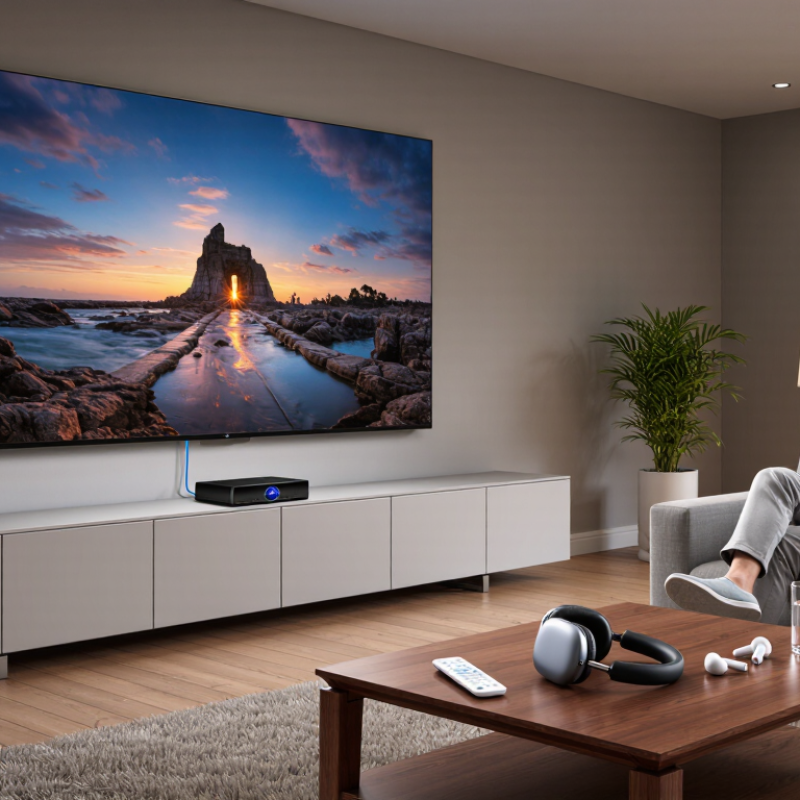
A Bluetooth audio transmitter for TV is a small device that sends television sound to wireless headphones or speakers. It usually connects through an optical, AUX, or RCA audio output. Unlike a Bluetooth receiver, it does not mainly receive sound. It creates a wireless audio link from the TV.
This can make late-night viewing quieter for others. It can also help viewers who need clearer, closer sound. Bluetooth SIG’s 2023 Market Update projected more than 5 billion Bluetooth device shipments in 2023, rising toward 7 billion annually by 2028. That growth shows how common wireless audio has become, but compatibility still matters. A transmitter may support only certain audio codecs, pairing methods, or connection counts. Some TVs also mute their built-in speakers when an external output is active. It is not magic.
Tips: Check the TV’s available audio port first. Optical connections often provide cleaner sound than older analog cables. Choose a transmitter with low-latency support for dialogue and gaming. Keep it within a clear range of the headphones. Test the volume before watching. Small delays can feel surprisingly distracting. I still find setup less perfect than advertised, especially with older TVs. A careful trial remains useful.
A Bluetooth audio transmitter sends TV sound wirelessly to compatible headphones or speakers, allowing private listening, greater freedom of movement, and easier use with TVs that do not have built-in Bluetooth audio.
The chart shows representative end-to-end audio-latency ranges. Lower latency generally means better synchronization between voices and on-screen movement. Actual performance depends on the TV, transmitter, codec, headphones, distance, and wireless interference.
A Bluetooth audio transmitter sends your television’s sound to wireless headphones, earbuds, or speakers. It connects through an available audio output, such as optical, 3.5mm, or RCA. In a typical living room, the transmitter sits near the TV and receives power from a USB port or wall adapter. After switching it on, place the receiving device in pairing mode. The two devices then exchange a wireless connection without changing the television’s internal speakers.
Check the television’s audio settings carefully. Optical connections may require PCM output instead of automatic or surround formats. This detail is easy to miss. Some transmitters support two listening devices, but distance and walls can reduce stability. Keep the receiver within a clear range when possible. I have found that wired headphones often respond faster during fast dialogue or gaming. Bluetooth performance depends on the transmitter, receiver, and audio codec, so slight delay remains possible. The setup is not always flawless. If voices sound late, try another connection type, reduce nearby wireless interference, or choose equipment designed for low-latency audio. Volume control can also behave differently, especially through optical output. Testing the system with a familiar program helps reveal these limitations before regular use.
| Data Dimension | How the Bluetooth Transmitter Works | Typical Performance or Requirement | Practical Benefit |
|---|---|---|---|
| TV Audio Source | The transmitter receives audio from a compatible output on the television and converts it into a wireless Bluetooth signal. | Common inputs include a 3.5 mm headphone output, digital optical output, or RCA audio output, depending on the transmitter. | It can add wireless audio to many TVs that do not have built-in Bluetooth audio support. |
| Supported Wireless Devices | The transmitter sends the TV audio to paired Bluetooth receivers. | Compatible devices may include Bluetooth headphones, earbuds, speakers, and some hearing-aid accessories that support the required Bluetooth audio profile. | Viewers can listen privately without connecting a long cable across the room. |
| Connection Process | After the transmitter is connected to the TV, pairing mode allows it to discover and connect with a nearby wireless device. | Initial pairing generally takes a few steps; later connections are usually automatic when both devices are powered on and within range. | Once configured, everyday use is simple and requires little manual setup. |
| Typical Indoor Range | The wireless signal travels directly between the transmitter and the paired device. | Approximately 10 meters in a typical indoor environment. | The listener can move around a normal living room while remaining connected. Walls, furniture, and radio interference may reduce the range. |
| Audio Delay | Audio is encoded, transmitted, received, and decoded before reaching the headphones or speaker. | Delay varies by the transmitter, receiver, and Bluetooth codec. Low-latency support can reduce noticeable lip-sync delay, but both devices must support it. | A suitable low-latency combination provides a better experience for films, television programs, and gaming. |
| Audio Quality | The transmitter compresses the TV audio according to a codec supported by both connected devices. | Sound quality depends on the codec, signal strength, source audio, and receiver design. Bluetooth audio is normally intended for personal listening rather than lossless studio reproduction. | Users can enjoy clear speech and music without installing speaker cables. |
| Volume Control | Volume may be adjusted on the headphones or speaker, on the TV, or through both devices, depending on the connection type. | Digital optical connections may require separate volume control because many TVs do not change optical output volume. | Independent volume control can help different viewers listen at comfortable levels. |
| Multiple Devices | Some transmitters can send audio to two Bluetooth devices at the same time. | Dual-device support is model-dependent and may reduce available bandwidth or affect synchronization between devices. | Two people may listen privately together, such as when they require different volume levels. |
| TV Speaker Operation | The transmitter does not automatically control how the TV handles its built-in speakers. | Some TVs mute their speakers when using a headphone output, while optical and RCA outputs may leave the speakers active. Settings differ by television. | Checking the TV audio menu helps prevent unwanted sound from the built-in speakers. |
| Power Requirement | The transmitter needs electrical power to receive, process, and transmit the audio signal. | Many units use USB power; some include an internal rechargeable battery. A powered USB port or wall adapter may be required. | USB-powered models are convenient for permanent placement near the TV. |
| Compatibility Check | The TV output and the transmitter input must use matching connectors and audio formats. | For optical connections, the TV may need to be set to PCM or another format supported by the transmitter. HDMI-only audio outputs may require an additional audio extractor. | Checking the TV manual and transmitter specifications before installation helps avoid silent output or connector mismatches. |
| Interference Factors | Bluetooth shares the 2.4 GHz radio band with other household wireless equipment. | Congestion, physical obstacles, and distance can cause dropouts or reduced range. | Placing the transmitter in an open location and keeping it away from dense wireless equipment can improve stability. |
| Best Use Case | The transmitter provides a wireless bridge between a TV and a Bluetooth audio device. | It is especially useful for private listening, late-night viewing, reducing cable clutter, and assisting viewers who need a different listening volume. | It upgrades a compatible TV setup without replacing the television or installing a complete wireless sound system. |
A Bluetooth audio transmitter gives a television a simple wireless audio path. It connects through optical, 3.5mm, or another supported output. Then it sends sound to compatible headphones or speakers. This removes a cable across the room. It also keeps listening more private during late-night viewing. Quiet scenes become easier to hear without raising the television volume. That matters in apartments and shared homes.
The strongest benefit is personal volume control. One viewer can use headphones while another listens softly through the TV, if the television supports simultaneous output. This can help people with mild hearing difficulty follow dialogue more clearly. It may also reduce repeated volume changes during films, sports, and news. Bluetooth can make the setup less intimidating. Pairing usually takes a few steps. Not always.
Practical performance depends on distance, walls, and the receiving device. A transmitter placed near the TV usually gives a steadier connection than one hidden behind other equipment. Audio delay is another detail worth checking. Some combinations keep speech aligned, while others create an obvious lip-sync mismatch. Battery charging becomes part of the routine, too. It is not flawless. I have found wireless listening more comfortable, but not automatically better. Checking the television’s audio outputs and the transmitter’s supported formats can prevent an expensive mismatch.
A Bluetooth audio transmitter can send television sound to wireless headphones or speakers. It helps viewers listen privately without raising the room’s volume. This is useful in shared homes, late-night viewing, or rooms with poor speaker placement. However, compatibility deserves attention before purchase.
Check the television’s available audio output first. Common options include optical, 3.5 mm, RCA, and sometimes HDMI ARC. The transmitter must support the same connection. Some TVs send audio only through one selected output. Others disable internal speakers when headphones are connected. Read the television manual carefully. It prevents frustrating trial and error.
The receiving headphones or speaker must also support the transmitter’s Bluetooth profile and preferred codec. Newer codecs may reduce delay and preserve more detail, but both devices must support them. Otherwise, the connection may use a basic codec with softer treble or weaker timing.
Latency matters. A noticeable delay can make dialogue feel disconnected from lip movements. Choose a low-latency mode when available, especially for films, news, and gaming.
Audio quality also depends on distance, walls, wireless congestion, and transmitter placement. Keep the unit away from routers and crowded cable areas when possible. In my experience, a clear connection is not always a high-fidelity connection.
Test speech, music, and quiet scenes separately. Test it first. A transmitter may solve listening comfort while revealing limitations in the TV’s own audio output.
A Bluetooth transmitter sends TV audio to compatible headphones or speakers without cables across the room. Bluetooth SIG’s 2024 Market Update projects annual Bluetooth device shipments will grow from 5.4 billion in 2023 to 7 billion in 2028. That scale supports the technology, but compatibility still matters. Check the television’s output first. Optical, 3.5mm, and RCA ports need different cables or adapters. HDMI-ARC is not automatically supported.
Choose a transmitter with low-latency support, especially for dialogue-heavy programs. Confirm that the transmitter and headphones share a suitable codec. Dual-link support helps two listeners connect, although range and synchronization may weaken. Optical output may require PCM mode in the television menu. Small details matter.
In one home setup, I once blamed the transmitter for delayed voices. The TV was sending an incompatible audio format. Switching to PCM fixed it. Still, the result was not perfect. Some broadcasts create their own delay, and walls reduce stable range. Place the transmitter in open air, near the seating area. Pair devices within one meter during setup. Bluetooth SIG also reports growing adoption of Bluetooth LE Audio, which may improve efficiency and shared listening. Verify actual menu options, not packaging claims.
It sends television sound to compatible wireless headphones, earbuds, or speakers. No cable crosses the room.
Common options include optical, 3.5mm, and RCA outputs. Each port may require a different cable or adapter.
Place the transmitter near the television and connect its power. Select the audio output, then pair the receiver within one meter.
The television may use an automatic or surround format. Change the optical output to PCM in the audio menu.
Some transmitters support two receiving devices. Walls and distance may weaken connection stability or synchronization.
Delay can come from the transmitter, headphones, codec, or broadcast. Try low-latency equipment or another audio connection.
Keep it in open air near the television or seating area. Avoid hiding it behind other equipment or thick obstacles.
Not always. Wireless listening feels comfortable, but wired headphones often respond faster during dialogue or gaming.
Confirm the television’s output, supported formats, low-latency features, and receiver compatibility. Packaging claims can be incomplete.
Headphone batteries need charging, and volume control may behave differently through optical output. Test a familiar program first.
A bluetooth audio transmitter for tv is a compact device that sends sound from a television to compatible wireless headphones, speakers, or other audio equipment. It usually connects to the TV through an optical, auxiliary, or audio output, then transmits the sound using Bluetooth. This allows viewers to enjoy clearer, more personal audio without disturbing others in the room. It can also be useful for improving listening comfort during movies, shows, or gaming.
When choosing a transmitter, check whether it supports your TV’s available audio connection and your preferred Bluetooth devices. Audio quality, transmission range, connection stability, latency, and support for multiple devices are important considerations. Some televisions may require changes to their sound settings before pairing works correctly. A simple setup generally involves connecting the transmitter, selecting the proper TV audio output, putting the wireless device into pairing mode, and confirming the connection. Choosing a suitable model and following these steps can create a convenient and flexible home audio experience.